

Pinterest has long been a leading platform for visual inspiration. It gives users a simple way to discover new ideas, trends, and creative content. As we move into 2024, understanding Pinterest Pin Sizes 2024 is more important than ever. The size of your Pinterest pins can affect how visible they are and how much engagement they receive. This guide explains the most important Pinterest pin sizes for 2024, why they matter, and how to use them correctly. Perfect image size can help digital marketers, brand owners, and regular Pinterest users reach more people and get better results.
Why Pin Size Matters
The size of your Pinterest pins plays a pivotal role in how they perform on the platform. Pinterest pin sizes are not just about aesthetics; they affect how your pins appear in users’ feeds and how likely they are to be engaged with. Larger, well-sized pins are more likely to catch users’ attention, especially as they scroll through a sea of content. Pinterest’s algorithm also tends to favor pins that conform to its recommended sizes, which can improve your pins’ visibility and engagement rates. By using the correct Pinterest pin sizes, you align with Pinterest’s best practices, enhancing the chances that your pins will be featured and seen by a larger audience.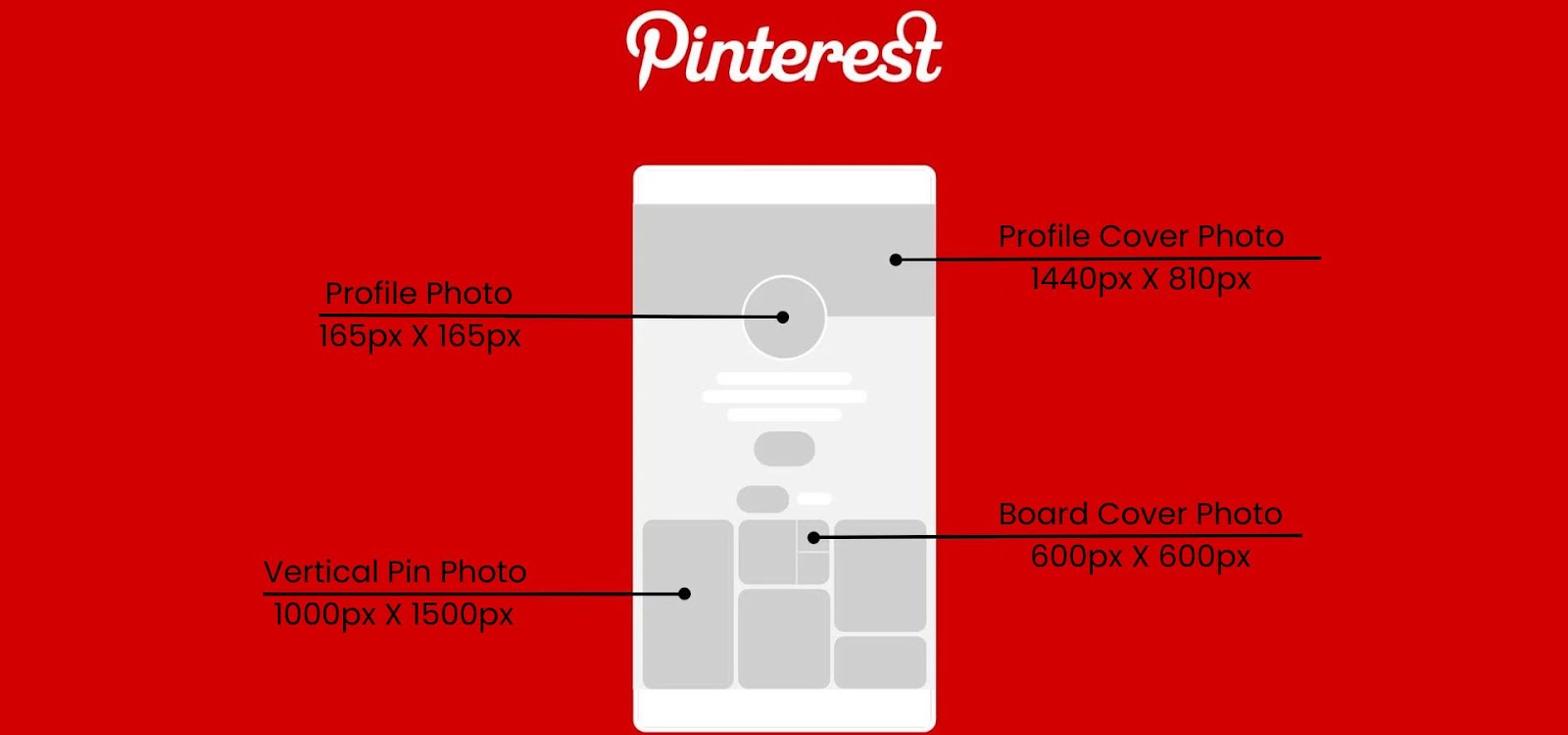
Current Pinterest Pin Size Recommendations
In 2024, Pinterest still gives more value to vertical pins because they work well in the feed. To get the best results, follow the Pinterest Pin Sizes 2024 guidelines and use pins that are 1000 x 1500 pixels. This gives your pins a 2:3 ratio. It helps them look clear and easy to see in users’ feeds. Video pins should also use the right size, so they look good on mobile screens. By using the correct Pinterest pin sizes, your content can look better and perform well across different formats.
Vertical Pins vs. Horizontal Pins
Vertical pins have emerged as the preferred format on Pinterest due to their ability to utilize more screen space. This makes them more prominent and engaging, particularly on mobile devices where vertical scrolling is prevalent. Vertical Pinterest pin sizes are optimal for detailed images, infographics, or long-form content that benefits from additional space. Conversely, horizontal pins are less common but can be effective for showcasing wide content such as panoramic images or product collections. Understanding the advantages of each format and selecting the appropriate Pinterest pin sizes can enhance your pin’s performance and appeal.
Recommended Dimensions for Different Pin Types
Each type of Pinterest pin has specific size recommendations to ensure optimal performance:
- Standard Pins: The ideal size is 1000 x 1500 pixels, maintaining a 2:3 aspect ratio.
- Video Pins: These should also be 1000 x 1500 pixels or use a 9:16 aspect ratio for full-screen mobile viewing.
- Carousel Pins: Each image within the carousel should be 1000 x 1500 pixels, with a maximum of ten images allowed.
- Idea Pins: For a full-screen vertical experience, Idea Pins should be 1080 x 1920 pixels.
By adhering to these Pinterest pin sizes, you can create visually appealing content that performs well across different pin formats and engages your audience effectively.
Creating Pins for Mobile vs. Desktop
Most people use Pinterest on their phones. So your pins should be easy to see on small screens. Following Pinterest Pin Sizes 2024 can help you make mobile-friendly pins. Use clear images, large text, and a simple design. This makes your pins easier to read and tap. Desktop users may see bigger pins, but your design should still look good on all devices. This helps users enjoy your content on both mobile and desktop.
How to Design Eye-Catching Pins
To make your Pinterest pins stand out, focus on incorporating high-quality visuals and engaging text overlays. Use bold colors and contrast to make your pins eye-catching, and ensure that the text is easy to read. Consistent branding, including colors and fonts, helps in creating a cohesive look that reinforces your brand identity. Utilize the visual hierarchy to direct users’ attention to the most important elements of your pin, enhancing its effectiveness in conveying your message.
Tools for Designing Pinterest Pins
Several design tools can help you create professional and visually appealing Pinterest pins. Canva and Adobe Spark offer user-friendly interfaces and templates specifically designed for Pinterest, making it easier to design pins that adhere to the recommended sizes. Photoshop provides more advanced customization options for those looking to create highly tailored designs. These tools can streamline the design process and help you produce pins that capture attention and drive engagement.
Optimizing Pins for SEO
SEO helps more people find your Pinterest pins. Use Pinterest Pin Sizes 2024 with the right keywords in your pin titles and descriptions. This can help your pins show up in search results. You can also use hashtags to group your pins and reach more users. Add alt text to your pins so Pinterest can understand your content better. When you optimize your pins for SEO, more interested users can see and click on your content.
Testing and Analyzing Pin Performance
To refine your Pinterest strategy, it’s essential to test and analyze the performance of your pins. Track metrics such as impressions, saves, and click-through rates to assess how well your pins are performing. Pinterest Analytics provides insights into which pins are resonating with your audience and which areas may need improvement. By regularly reviewing these metrics and making data-driven adjustments, you can enhance your Pinterest strategy and achieve better results.
Common Mistakes to Avoid
When creating Pinterest pins, avoid common mistakes that can negatively impact your performance. One frequent error is neglecting mobile optimization, which can lead to poor user experience on smaller screens. Additionally, not adhering to Pinterest’s recommended pin sizes can result in ineffective or removed pins. Ensure that your pins meet Pinterest’s guidelines and are designed to provide a seamless experience for users across different devices.
Case Studies: Successful Pin Strategies
Studying successful Pinterest campaigns can provide valuable insights and inspiration for your own strategies. Analyze examples where specific Pinterest pin sizes and designs led to high engagement and positive results. Understanding the tactics used in these successful campaigns can help you apply similar strategies to your own content, improving your Pinterest performance and effectiveness.
Future Trends in Pinterest Pin Design
As Pinterest continues to evolve, new design trends are likely to emerge. Keeping an eye on future developments, such as augmented reality pins or interactive features, can help you stay ahead of the curve. By adapting to these trends and incorporating them into your Pinterest strategy, you can remain competitive and continue to engage effectively with your audience.
Conclusion
Learning Pinterest Pin Sizes 2024 can help you build a stronger presence on Pinterest. Use the right pin sizes for both mobile and desktop users. Also, keep your design clear, simple, and easy to read. This can help your pins get more views, clicks, and saves. Keep checking new Pinterest trends and update your strategy when needed. This will help you stay ahead of others and get better results on Pinterest.
FAQs
What is the best Pinterest pin size for 2024?
The best Pinterest pin size for 2024 is 1000 x 1500 pixels, maintaining a 2:3 aspect ratio for standard pins.
How do I create mobile-friendly Pinterest pins?
Design your Pinterest pins with large, readable text and high-quality visuals that are clear on smaller screens to ensure they are mobile-friendly.
What are the benefits of vertical pins?
Vertical Pinterest pins are more prominent in users’ feeds, making them more engaging and likely to attract attention, especially on mobile devices.
How can I optimize my Pinterest pins for SEO?
Incorporate relevant keywords into your pin titles and descriptions, use hashtags, and add alt text to improve your Pinterest pins’ discoverability and relevance.
What tools can I use to design Pinterest pins?
Tools like Canva, Adobe Spark, and Photoshop are excellent for designing Pinterest pins that adhere to the recommended sizes and attract user engagement.















