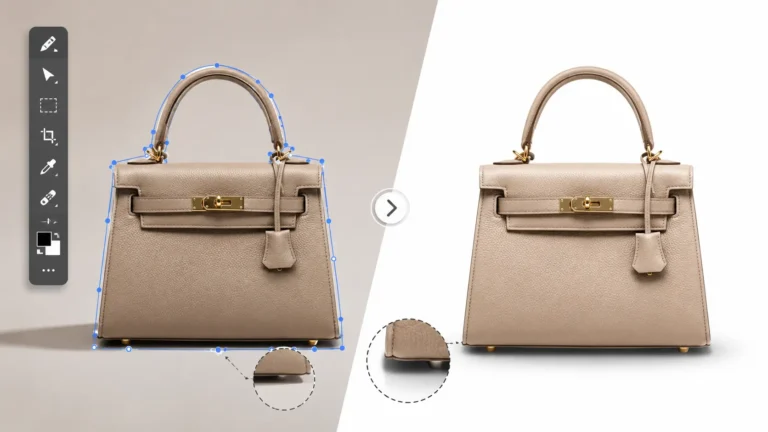
After removing the background, a product photo can look clean but still feel a little off. The item may have sharp edges and a white background, yet it might look like it is floating instead of sitting on a surface.
That usually happens when the editor removes the background but does not rebuild the shadow. A clipping path handles the clean cutout. Shadow creation adds the soft depth that makes the product feel real.
For online stores, catalogs, ads, and marketplace listings, that small shadow can make a big difference. It helps buyers understand the product shape and gives the photo a more natural look. This guide explains how clipping path for shadow creation help make product photos look cleaner, grounded, and ready to sell.
What Are Clipping Path for Shadow Creation?
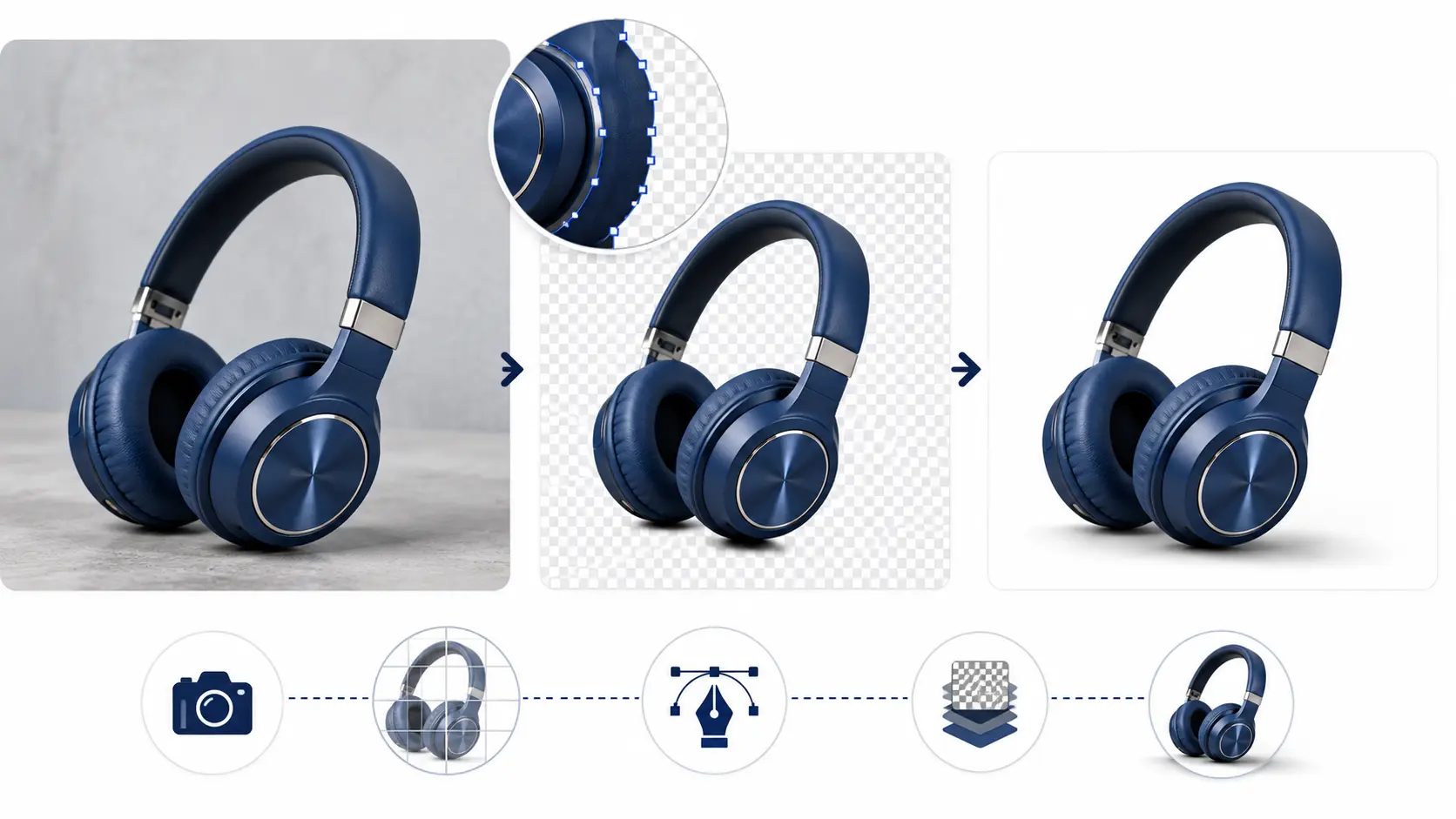
Clipping path for shadow creation combine two important editing steps. First, an editor cuts out the product from its original background. Then, the editor adds or rebuilds the shadow so the product does not look flat.
This process helps product photos look clean, natural, and ready for online use. For example, if a shoe photo loses its floor shadow after background removal, the editor can create a soft shadow under it. As a result, the shoe looks like it is sitting on a real surface.
What Is a Clipping Path?
A clipping path is a precise outline around a product. Photo editors usually create it in Adobe Photoshop with the Pen Tool.
The main goal is simple. The editor separates the product from the background without damaging its shape. This works well for products with clear edges, such as boxes, shoes, bags, furniture, bottles, and fashion items.
What Is Shadow Creation?
Shadow creation is the process of adding realistic shadows under or around a product. It helps the image look more natural after background removal.
Without a shadow, the product can look like it is floating on a white background. However, a soft and well-placed product photo shadow gives the item depth, weight, and balance. This makes the photo look more believable to buyers.
How Clipping Path and Shadow Creation Work Together
When an editor removes the background, the original shadow often disappears too. That can make the product look clean, but not realistic.
For this reason, clipping path and shadow creation usually work best together. The clipping path creates the clean cutout, while shadow creation restores the natural depth. In short, one gives the product a clean shape, and the other makes it look grounded.
Why Shadow Creation Matters in Product Photo Editing
Product photo editing is not only about removing the background. The final image also needs to look real, clean, and trustworthy. That is why shadow creation plays an important role after a clipping path service.
A clean white background can make a product look neat. However, if the product has no shadow, the image may look unfinished. For e-commerce stores, catalogs, ads, and marketplace listings, this can affect how buyers see the product.
Good shadow work helps create a consistent product presentation. It also makes the image feel more natural, especially when customers compare many products on the same page.
It Makes Product Photos Look More Realistic
A product without a shadow can look pasted onto the background. It may look clean, but it does not feel real.
A soft shadow under the product fixes that problem. For example, a shoe with a natural shadow looks like it is sitting on a surface. As a result, the photo feels more believable and less edited.
It Improves Customer Trust
Online shoppers cannot hold the product in their hands. Therefore, they depend on photos to understand the shape, size, texture, and quality.
Realistic shadows help buyers read the image more clearly. For example, a bag with a soft bottom shadow can show its structure better. Also, a cosmetic bottle with a light shadow can look more stable and real.
When the product photo looks natural, buyers feel more confident. That confidence can help them move closer to buying.
It Creates a Premium Product Look
Small editing details can change how a product feels. A soft, natural shadow can make a simple product photo look more polished.
This works well for jewelry, shoes, bags, furniture, cosmetics, and fashion items. For example, a ring with a light reflection shadow can look more elegant. On the other hand, a sofa may need a soft floor shadow to show weight and size.
Most importantly, the shadow should not look too dark or heavy. A premium product image usually needs a clean shadow that supports the product without stealing attention.
It Helps Maintain Image Consistency
Consistency matters when a store has many product photos. If one product has a dark shadow and another has no shadow, the collection can look messy.
For this reason, many businesses use clipping path for shadow creation across full product batches. This helps Amazon listings, Shopify stores, catalogs, and ad images follow the same visual style.
Consistent shadows also make product pages look more professional. In short, buyers notice the product first, not the editing mistakes.
Common Types of Shadow Creation Services
Not every product needs the same type of shadow. A small jewelry item, for example, should not have the same shadow style as a sofa or a pair of sneakers. That is why professional editors choose the shadow based on the product shape, lighting, background, and selling platform.
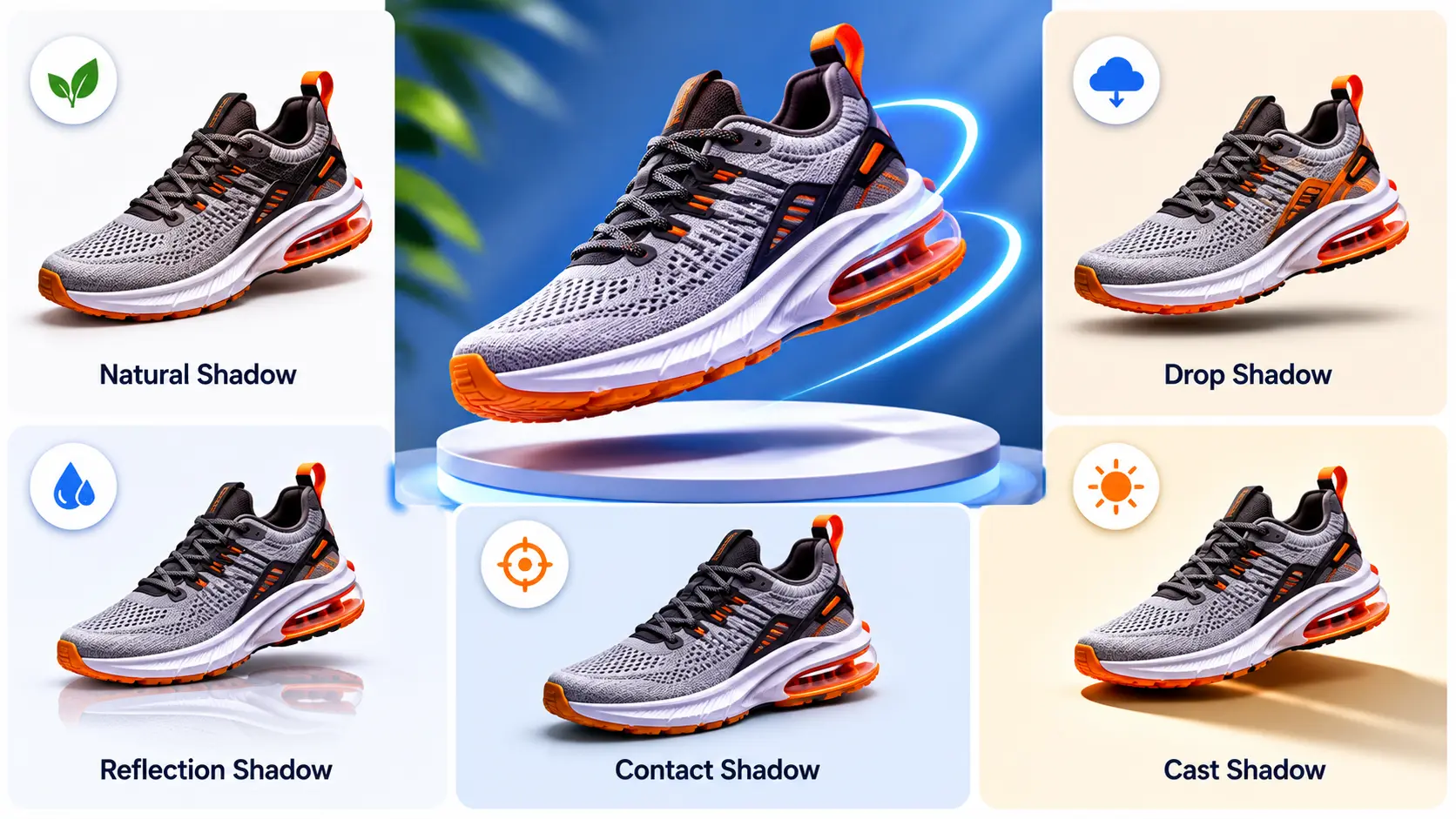
The most common shadow creation services include natural shadow, drop shadow, reflection shadow, floating shadow, and cast shadow. Each one gives a different look. Also, each one works better for certain product categories.
Natural Shadow
Natural shadow keeps or recreates the product’s original shadow. It usually looks soft, realistic, and close to how the product looked during the shoot.
This type of shadow works well when the goal is to make the image look real, not heavily edited. For example, a shoe with a natural shadow looks like it is sitting on a clean studio surface. As a result, the product feels more believable to shoppers.
Best for:
Shoes, bags, furniture, bottles, cosmetics, and lifestyle-style product photos.
Drop Shadow
Drop shadow adds a shadow behind or under the product to create depth. It is one of the most common styles in product image editing because it works well with clean backgrounds.
A drop shadow can make a product stand out without making the image look too busy. However, the editor needs to keep it soft and balanced. If the shadow looks too dark, the photo can feel cheap or over-edited.
Best for:
Simple product images, catalogs, website banners, and clean white-background images.
Reflection Shadow
Reflection shadow creates a light mirror-like effect under the product. It gives the image a polished and premium feel.
This style works especially well for shiny, glass, or luxury products. For example, watches, sunglasses, and perfume bottles often look better with a soft reflection under them. Still, the reflection should look subtle. A strong reflection can distract buyers from the actual product.
Best for:
Jewelry, watches, sunglasses, electronics, glass bottles, and luxury items.
Floating Shadow
Floating shadow makes the product look slightly raised from the surface. The shadow usually appears below the product, with a small gap between the item and the shadow.
Editors often use this style for creative product displays and modern ads. For example, a folded T-shirt, handbag, or accessory can look more stylish with a floating shadow. In addition, this shadow style can add movement to an otherwise simple product photo.
Best for:
Apparel, accessories, creative ads, and modern product displays.
Cast Shadow
Cast shadow follows the direction of light in the image. It gives the product a more natural 3D look because it matches how shadows appear in real life.
This type of shadow needs more care than a basic drop shadow. The editor must check the light source, product angle, and surface direction. For this reason, cast shadow works best when the image already has clear lighting or a realistic scene.
Best for:
Products shot with visible light direction, studio setups, realistic scenes, and lifestyle-style product images.
Which Products Need Clipping Path and Shadow Creation?
Clipping path and shadow creation work best for products that need clean edges, white backgrounds, and a natural look. These services are especially useful for e-commerce photo editing, catalogs, ads, and marketplace listings.
Fashion and Apparel Products
Clothing, shoes, bags, belts, hats, and accessories often need clean cutouts and soft shadows. For example, shoes may look like they are floating after background removal, so a natural shadow helps them look grounded.
Jewelry and Watches
Jewelry and watches need a polished look because small details matter. Reflection shadow or soft shadow can make rings, bracelets, and watches look more premium without making the image too heavy.
Furniture and Home Decor
Furniture needs shadows because large products should look stable and realistic. A sofa, chair, table, or lamp can look strange on a white background if it has no floor shadow.
Electronics and Gadgets
Phones, laptops, headphones, speakers, and cameras need sharp edges and clean presentation. A light drop shadow or reflection shadow can make these products look modern and professional.
Beauty and Cosmetic Products
Bottles, jars, tubes, boxes, and cosmetic packaging look better with soft shadows. For example, a skincare bottle with a light shadow feels more stable and less flat.
Amazon, Shopify, and Marketplace Product Images
Amazon, Shopify, Etsy, eBay, and WooCommerce sellers need clean, consistent product photos. Clipping path and shadow creation help keep background style, sizing, margins, and shadows consistent across full product collections.
How the Clipping Path Shadow Creation Process Works
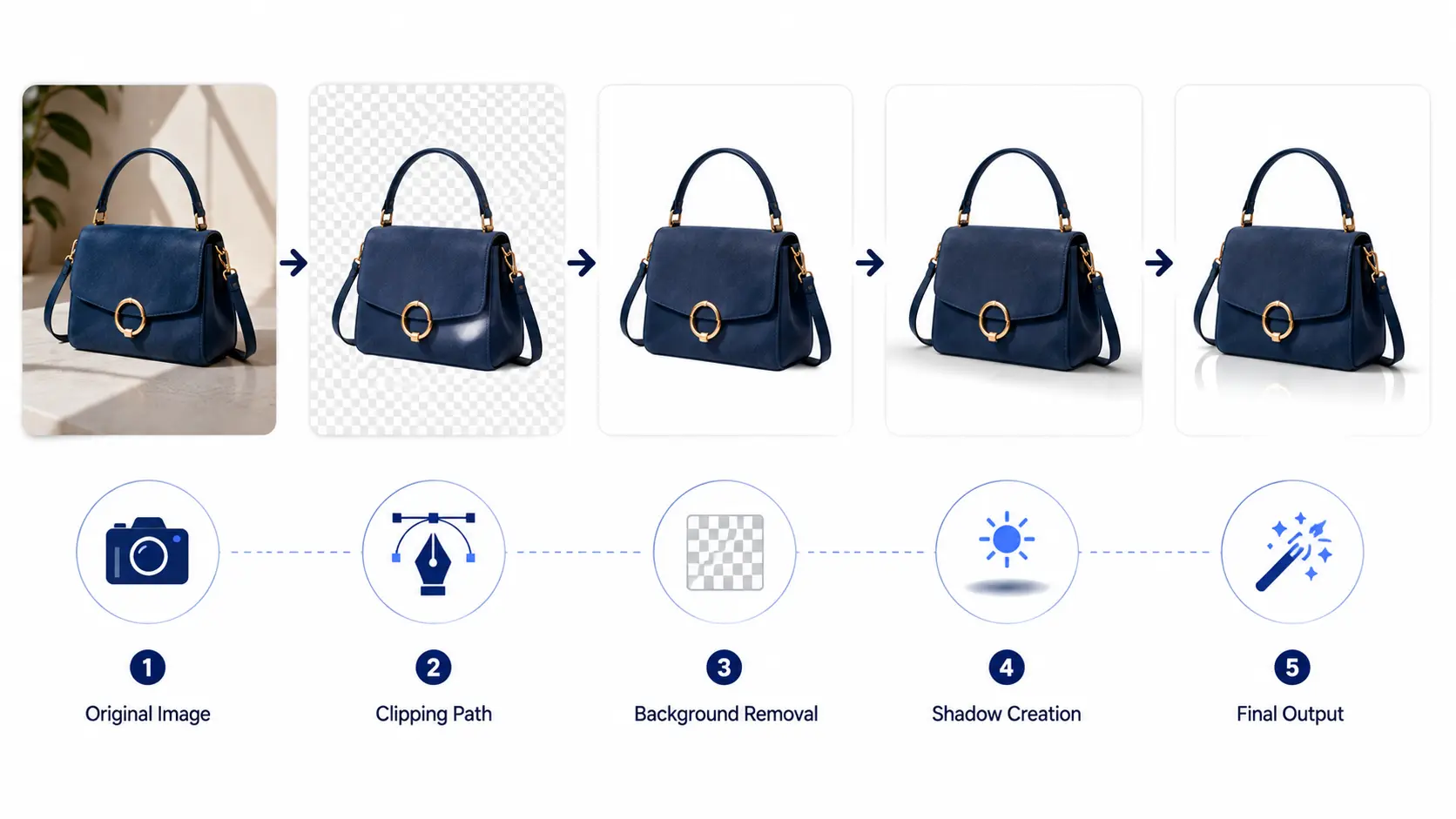
A good clipping path and shadow creation process is more than quick background removal. Editors check the product, cut it out cleanly, rebuild the shadow, and review the final image before delivery.
Step 1: Image Review
First, the editor checks the product shape, edges, background, lighting, and existing shadow. This helps decide what type of clipping path and shadow style the image needs.
Step 2: Manual Clipping Path
Next, the editor draws a manual clipping path around the product, usually in Photoshop. A hand-drawn path gives clean and accurate edges, especially for products with hard edges like boxes, bottles, shoes, and electronics.
Step 3: Background Removal or Replacement
After that, the editor separates the product from its original background. Then, they place it on a clean white, transparent, or custom background based on the client’s need.
Step 4: Shadow Creation or Shadow Restoration
Once the background changes, the original shadow may disappear. Therefore, the editor creates or restores a natural shadow, drop shadow, reflection shadow, or floating shadow based on the product type.
Step 5: Retouching and Quality Check
Then, the editor checks the image for rough edges, dust, spots, color issues, and shadow mistakes. Small fixes like brightness adjustment and edge cleanup can make the final photo look much more professional.
Step 6: Final File Delivery
Finally, the edited image is delivered in the required format. Common file types include JPG, PNG, PSD, TIFF, and WebP, depending on where the image will be used.
Clipping Path vs Image Masking for Shadow Creation
Clipping path and image masking both help editors separate a product from its background. However, they work best for different image types. For shadow creation, choosing the right method helps keep the product edges clean and the shadow natural.
When to Use Clipping Path
Use clipping path for products with hard, clean edges, such as boxes, shoes, watches, furniture, bottles, and electronics. A hand-drawn clipping path gives the editor better control over the product outline. As a result, the cutout looks sharp and works well with white backgrounds, catalogs, and e-commerce listings.
When to Use Image Masking
Use image masking for soft, fine, or transparent edges. This includes hair, fur, lace, smoke, glass, transparent fabric, and see-through products. Masking helps keep small details that a clipping path may cut off, so the final image looks more natural.
When Both Are Needed
Some product photos need both clipping path and masking. For example, a handbag may have hard edges, soft straps, and fabric texture. In that case, the editor can use clipping path for the main shape and masking for the fine details, which gives better edge control and more realistic shadow creation.

Benefits of Outsourcing Clipping Path for Shadow Creation
Many businesses outsource clipping path for shadow creation because product editing takes time and skill. A few images may be easy to edit in-house. However, editing hundreds of product photos with clean cutouts, natural shadows, and consistent style can quickly become hard to manage.
Professional editors already know how to handle background removal, product photo shadow, edge cleanup, and final file preparation. As a result, brands can focus more on selling, marketing, and product updates.
Saves Time for Bulk Product Editing
Outsourcing saves a lot of time when a business has hundreds or thousands of product images. For example, an online fashion store may need shoes, bags, belts, and apparel edited before a new collection goes live. Instead of spending days on manual editing, the brand can send the images to a photo editing team and get them back ready for upload.
Gives Consistent Results
Consistency matters in e-commerce photo editing. Professional editors can follow the same shadow direction, size, softness, background style, and image margin across a full batch. As a result, product pages, catalogs, and marketplace listings look clean and organized.
Improves E-commerce Presentation
Good product image editing helps buyers see the product more clearly. A clean cutout with a natural shadow can make the item look more realistic and trustworthy. In addition, better image presentation can support brand value because customers often judge product quality from the photo first.
Reduces Editing Costs
Outsourcing can cost less than hiring a full-time editing team. A business does not need to pay for extra salaries, software, training, or editing equipment. Instead, it can pay for the exact number of images it needs, which is useful for small stores, agencies, and seasonal product shoots.
Supports Fast Turnaround
Fast editing matters during product launches, holiday campaigns, catalog updates, and marketplace uploads. A professional shadow creation service can usually handle urgent batches faster than a small in-house team. Therefore, businesses can publish new products on time without rushing the editing quality.
How to Choose the Best Clipping Path Service for Shadow Creation
Choosing the right clipping path service for shadow creation is not only about price. You need clean edges, natural shadows, safe file handling, and reliable delivery. Before sending a bulk order, check how the company edits, communicates, and handles product image quality.
Check Their Portfolio
First, review their before-and-after samples. Look for products similar to yours, such as jewelry, shoes, cosmetics, furniture, electronics, or apparel. If their samples show clean cutouts and realistic shadows, they are more likely to handle your images well.
Ask About Manual Editing
Manual clipping path editing usually gives better results than quick automatic selection. A skilled editor can follow the product shape carefully and keep the edges clean. This matters most for hard-edge products like boxes, bottles, watches, shoes, and gadgets.
Review Turnaround Time
Turnaround time matters, especially if you have a product launch or catalog update. Ask about their standard delivery time and rush delivery option. However, do not choose speed only; fast work still needs clean edges and natural shadow quality.
Ask for a Free Trial
A free trial helps you test the service before sending a large batch. Send one or two sample images with clear instructions. Then, check the clipping path, shadow softness, background, edge quality, and final file format.
Check File Security
Product photos can include unreleased items, private campaigns, or brand assets. Therefore, ask how the company protects your files. A good service should offer secure upload, client privacy, and an NDA if your project needs extra protection.
Compare Pricing by Complexity
Pricing can change based on image complexity, shadow type, quantity, and delivery time. Some services show very low starting prices per image, but the final cost may increase for complex products, urgent delivery, or advanced shadow work. For this reason, ask for a clear quote before placing a bulk order.
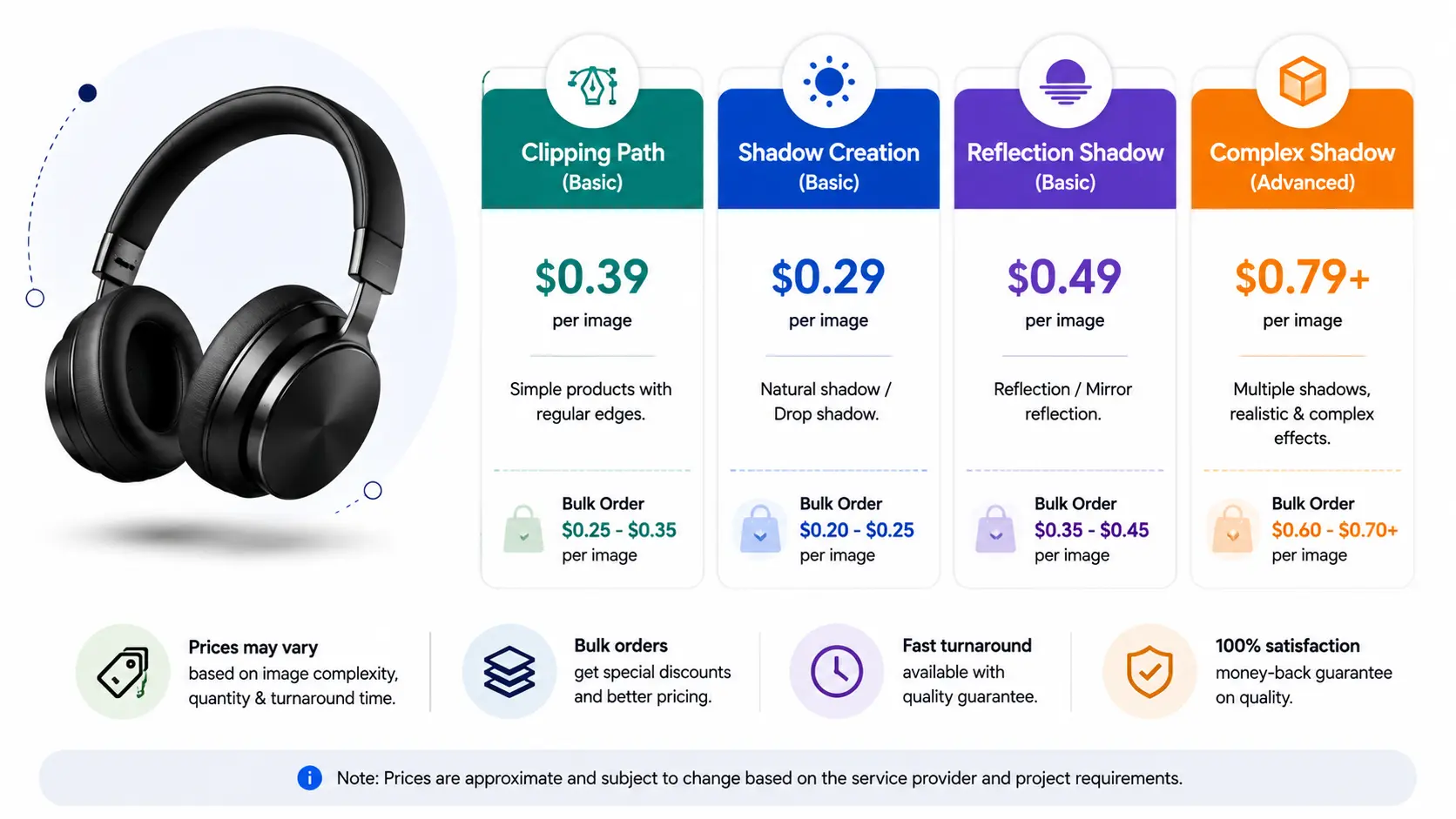
How Much Do Clipping Path and Shadow Creation Services Cost?
The cost of clipping path and shadow creation services depends on image complexity, shadow type, order quantity, and delivery time. A simple product cutout with a basic drop shadow will cost less than jewelry, glass, furniture, or group product editing.
For this reason, most photo editing companies give custom quotes after checking sample images.
Simple Product Images
Simple images usually have one product, clean edges, and a basic shape. Boxes, books, bottles, and simple shoes often need only a clean clipping path and a basic drop shadow, so they usually cost less.
Medium Complexity Images
Medium images may include curves, holes, straps, transparent parts, or soft shadows. Handbags, sandals, belts, hats, and cosmetic packaging often need more careful edge work, so the price can be higher.
Complex Product Images
Complex images take the most time. Jewelry, bicycles, furniture, group products, glass items, and reflective products may need clipping path, masking, retouching, and reflection shadow. As a result, these images usually cost more.
Bulk Order Pricing
Bulk orders often get discounted pricing, especially when the images follow the same editing style. However, the final cost still depends on complexity and turnaround time, so it is best to share sample images before asking for a quote.
Final Thoughts: Is Shadow Creation Worth It for Product Photos?
Yes, shadow creation is worth it for most product photos. A clipping path creates a clean cutout, but the right shadow adds depth, realism, and a more professional look.
For e-commerce stores, catalogs, ads, and marketplace listings, this small detail can make product images look more trustworthy. However, the best shadow style depends on the product type, brand style, and sales channel.
In short, clipping path for shadow creation help flat product photos look cleaner, grounded, and ready for online selling.
Frequently Asked Questions
What are clipping path for shadow creation?
Clipping path for shadow creation separate a product from its background and add a realistic shadow so the product looks clean, natural, and professional.
Why do product photos need shadow creation after background removal?
After background removal, the original shadow often disappears. Shadow creation adds depth and makes the product look grounded instead of floating.
What is the best shadow type for e-commerce product photos?
Natural shadow is usually best for realistic e-commerce product photos. Drop shadow works well for clean catalog images, while reflection shadow is better for luxury or glossy products.
Is drop shadow good for Amazon product images?
Drop shadow can work if it looks soft, natural, and does not distract from the product. The image should still follow marketplace image guidelines.
What is the difference between natural shadow and reflection shadow?
Natural shadow makes the product look grounded on a surface. Reflection shadow creates a mirror-like effect, often used for jewelry, watches, glass items, and premium products.
How much does shadow creation service cost?
The cost depends on product complexity, shadow type, number of images, and turnaround time. Simple product images usually cost less than complex jewelry, furniture, or group product images.
Can clipping path handle bulk product images?
Yes. Professional clipping path often handle bulk product images for e-commerce stores, photographers, agencies, and catalog teams.
Do I need clipping path or image masking for shadow creation?
Use clipping path for hard-edge products. Use image masking for soft, hairy, transparent, or complex edges. Some images need both for the best result.