High-quality jewelry photos are important to highlight the natural shine, quality, and fine detail of each piece. Brands in countries including the USA, Europe, and worldwide use jewelry editing services to improve their product listings and marketing. Proper lighting and camera settings help you to achieve a clean polish and retouch image for e-commerce platforms. High-quality jewelry photography makes your brand look professional and helps increase sales. Our comprehensive guide includes essential tools, step-by-step editing processes, advanced techniques, and tips to avoid common mistakes.

What Are Techniques For Jewelry Photography?
Jewelry photography needs to showcase the true beauty and details in the photo. Jewelry photographers should be careful about lighting, focus, and reflection to show off the shine and texture. Proper, soft lighting is a key element in jewelry photography, as it minimizes harsh shadows and reflections. A tripod helps a jewelry photographer to achieve clear and precise photos. Even a small piece of dust or a fingerprint might ruin the jewelry photo. That’s why it’s important to clean up the jewelry image for every e-commerce platform. A jewelry retouching service provider can help you achieve a flawless image for your customers. You can take clear, beautiful pictures of your jewelry that show off its genuine beauty and draw the viewer’s attention right away if you learn these basic tips.
Choosing The Right Camera
Appropriately choosing a camera is one of the most crucial things to do while taking an image of jewelry. Jewelry has many fine details, such as design, shine, and texture. Your camera needs to take clear, high-quality images for commercial purposes. A DSLR or mirrorless camera is the ideal option because it has manual settings, interchangeable lenses, and takes great pictures. You may change settings like aperture, shutter speed, and ISO to achieve the perfect photo using these tools. For close-up or macro photographs, it’s important to have a camera with a lot of megapixels so you can see even the smallest details of jewelry photos. The most important thing is to know how to use your camera’s settings and lighting to show off the real beauty of your jewelry.
Lighting Techniques
Lighting is the major element of jewelry photography. It brings out the shine, color, and texture of each piece. Soft, indirect light is ideal to reduce harsh shadows and reflections so that metals and gemstones can shine naturally. Light tents, softboxes, and reflectors can all help make lighting even from all sides of jewelry. If you set up the appropriate lighting, your jewelry will look brilliant, detailed, and professionally polished.
Setting For Background
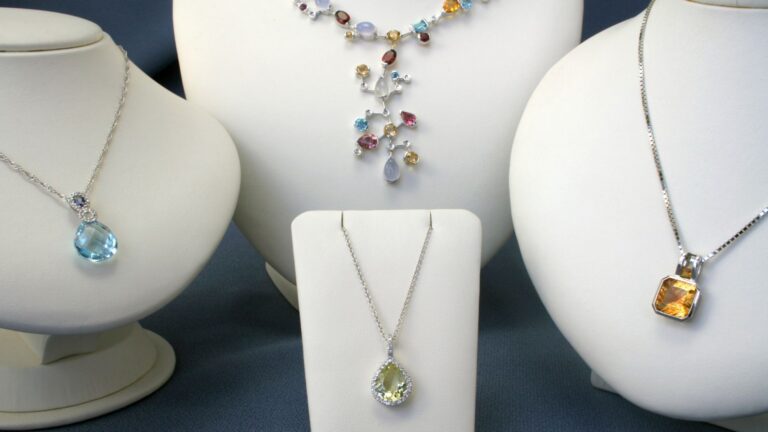
The background and location have a major effect on how jewelry looks in pictures. A clean, simple, white, black, or light gray background helps the jewelry product stand out and draws attention to the image. You can add a creative touch to your brand by using tactile materials like marble, velvet, or wood, depending on what your brand looks like. Always be sure that the setting doesn’t take away from the jewelry. A clean, well-balanced setting makes the jewelry look better and makes your images look more professional.
Preparing Jewelry For Photography
Clean each piece completely to get rid of dust, fingerprints, and smudges. Polishing metals and diamonds will make them shine more. Carefully arrange the jewelry so that it looks good and stays in place. Only use props or holders if they make the display better without taking away from the object. Getting ready properly can help you take clear, perfect pictures that show off the jewelry’s genuine beauty.
Cleaning And Polishing
Always clean jewelry before taking pictures of it to get rid of dust, fingerprints, and smudges. Polish metals and gemstones to make them shine naturally. Your pictures will look sharp, bright, and professional if the pieces are clean and polished. Be extremely careful with stones that are fragile or have complicated designs to keep them from becoming damaged. Cleaning your jewelry regularly also makes sure that it looks the same in all of your pictures, so it looks perfect in every one. A well-prepared piece makes it easy for the photographer to do their work and improves the quality of the finished photo.
Arranging and Positioning
Jewelry photographers need to keep the product in the right place and angle for focus on the jewelry. Photographers can use holders or supports for rings, necklaces, bracelets, and all kinds of jewelry products. Holders or supports help you to keep the perfect focus on the jewelry product while capturing a photo. You should understand the perfect lighting and reflection for metals and gemstones.
Which Tools Are Essential For Editing Jewelry Photos?
Jewelry retouch service makes your jewelry images look professional and polished for e-commerce platforms. High-end retouching can improve details, fix colors, and get rid of distractions with the right tools.
Adobe Photoshop and Lightroom are two kinds of photo editing software that let you make very precise changes to exposure, contrast, and color balance. The healing brush and clone stamp are two tools that can help get rid of dust, scratches, or reflections. You can change certain parts of an image without changing the rest of it with layer masks and selection tools.
Other important tools are sharpening filters to bring out fine details, highlight and shadow adjustments to control shine, and background removal tools to make sure everything looks clean and consistent.
You can turn raw shots into high-quality pictures that show off the jewelry’s shine, texture, and craftsmanship with these tools. This makes each piece look so good that it instantly attracts buyers.

Step-By-Step Guide To Editing Jewelry Photos
Jewelry product photos should be polished, professional, and interesting. Firstly, you need to take a high-resolution jewelry image for retouching. Then, crop and straighten them so they line up correctly. Jewelry retouching adjusts the exposure, brightness, and contrast. Color correction shows the perfect color, tone, hue, saturation, and white balance so that metals, gemstones, and pearls look natural. A professional jewelry retouching service provider removes dust, scratches, or reflections for a clean and sharpened look. Finally, we need to add shadows like natural, drop, reflection, and soft shadows. Ensure the jewelry looks crisp, clear, and visually appealing without over-editing.
Importing Your Jewelry Photos
The first step is to get the pictures of your jewelry into your editing program. To keep your workflow going smoothly, group them by category, collection, or style. Editing goes faster when your photos are well organized, and it also helps keep them all the same. This step also makes it easy to find and organize your files while you are editing.
Correct Color And Exposure
Change the exposure so that your jewelry is bright and easy to see without being too dazzling. Make the details, textures, and gemstones shine out by increasing the contrast. Fix the colors and white balance so the jewelry seems real and shows off its natural shine and brightness. Making the right changes in these areas will make your images look bright, professional, and appealing to the eye.
Enhancing Details
Concentrate on showcasing the jewelry’s delicate textures and complex patterns. Be careful when using sharpening tools to bring out facets, metal finishes, and gemstone cutting. Don’t sharpen too much to keep the picture looking natural while making every detail obvious. Adding more detail makes sure that your jewelry looks good and high-quality in every picture.
Background Adjustment
Take off any backgrounds that aren’t needed so that the jewelry is the only thing that stands out. Use selection or masking tools to cleanly remove the product. To make the jewelry stand out, change the background color to a neutral or brand-appropriate color if you need to. A clean, consistent background makes your images look professional and brings out the small details in each component.
Jewelry Photo Cropping And Resizing
Crop your pictures so that they focus on the jewels and get rid of any extra space. Resize your photographs to meet the needs of your platform while keeping them clear and high quality. When you crop and resize the jewelry correctly, it will seem professional, well-framed, and ready to be shown online or in catalogs.

Advanced Jewelry Photo Editing Techniques
Advanced jewelry editing makes your pictures move from good to great by paying close attention to accuracy, detail, and how they look. These methods do more than just make simple changes; they also bring out the glitter, texture, and craftsmanship of each piece. Jewelry photo editors can create depth and complexity by fine-tuning reflections, making highlights brighter, and changing shadows. Color grading makes sure that gemstones and metals look real, and cleaning them of flaws like dust and scratches keeps them ideal. These new techniques make pictures that not only show off the jewelry’s beauty but also catch people’s attention and make them want to buy it.
Focus Stacking
Focus stacking takes several pictures of the same piece of jewelry with different focus points to make sure that every part is clear and sharp. This method makes the final image look clear and professional by capturing intricate designs and diamonds effectively. It works well for close-up pictures where the depth of field is small. Editors can showcase every angle and feature of the jewelry by employing focus stacking. This makes the jewelry look more authentic and attractive.
Retouching And Cloning
Retouching and cloning can assist in getting rid of flaws in jewelry images, such as dust, scratches, or reflections that you don’t want. The retouching procedure makes the piece look better overall without changing how it really looks. Cloning lets you copy clean sections over spots to get a perfect finish. These tips will help your jewelry photos look polished, professional, and ready to encourage people to buy them.
Adding Shadows And Reflections
Shadows and reflections make pictures of jewelry look more real and natural. Soft shadows give the object depth and make it look like it’s not floating. When used carefully, reflections give the picture a sense of richness and depth. These effects enhance visual appeal, making the jewelry look more elegant, lifelike, and professional.
How To Maintain Natural Look
Keeping jewelry photos natural is essential to ensure they look realistic and appealing. Too much retouching can make pictures look fake, which could make customers less likely to trust you. A natural look highlights the jewelry’s true beauty, showing it just as it appears in real life. It helps customers feel good about their purchase and connect with the product. You may make the jewelry look better without losing its real attractiveness by paying attention to things like lighting, color balance, and small details. Follow these tips to maintain a realistic, professional appearance:
Avoiding Over-Editing
Avoid over-editing to make sure that pictures of jewelry look real and natural. Too much editing might take away crucial features, change colors, or make the picture look artificial. Make small changes that make the jewelry look better without changing its actual design and feel. Editing in a balanced way keeps your photographs looking professional and trustworthy.
Balance Highlights
Carefully points out the balance to avoid overexposure and keep the natural glow. Proper highlight management makes sure that metals and gemstones shine without sacrificing any details. Making sure that the highlights are the same across the whole picture helps give it depth and reality. This balance makes sure that your jewelry images are bright, attractive, and true to life.
Consistency Across Photos
To make your jewelry images look professional and put together, keep the style the same in all of them. For each picture, use the same lighting, background, and editing settings. Brand identification and trust are built by keeping the same color tones, brightness, and composition. Your collection seems clean, trustworthy, and attractive to clients when all of your photographs are the same style and quality.
How To Use Presets And Templates
Use templates and presets to save time and make sure that all of your jewelry photographs have the same editing style. Presets help apply the same color tones and immediately make changes to contrast and lighting to make sure everything looks the same. You can utilize templates to make standard backgrounds, layouts, or crop sizes. You can make your workflow smoother, get professional results faster, and keep your brand graphics consistent and polished by using these tools.
Creating Custom Presets
Make your own presets that fit your brand’s look and the way you like to edit. Change the settings for exposure, color balance, contrast, and sharpness, and then save them for later. Custom presets help keep the look of all the jewelry photos the same and cut down on the time it takes to edit them. They also make sure that every shot has the same quality, tone, and visual appeal, which gives your business a professional and consistent look.
Utilizing Ready-Made Templates
Use ready-made templates to make editing your jewelry photos simpler and easier. Templates let you easily apply ready-made settings, backgrounds, and layouts to a lot of different photographs. They help keep your collection consistent and save you time on actions that need to be repeated multiple times. With ready-made templates, you can get professional, polished results without restarting the process for every photo.
How To Avoid Common Mistakes
Even professionals who capture and edit pictures of jewelry might make mistakes that lower the quality of the final image. Knowing how to avoid these common mistakes and spotting them helps you take professional, attractive pictures.
Overexposure And Underexposure
Jewelry looks excessively brilliant when it is overexposed, which washes away features. When it is underexposed, it looks dark and dull. To get the jewelry’s true hues, luster, and tiny details, be careful when changing the lighting and camera settings. Proper exposure makes sure that each piece looks bright, crisp, and interesting.
Poor Lighting
Poor lighting can make jewelry look less appealing by making shadows too sharp, reflections too strong, or hues too bland. Use soft, diffused light and place it in a way that brings out the shine and details of each object. The right lighting makes jewelry look its best and makes your images look professional and polished.
Distracting Backgrounds
Distracting backgrounds take attention away from the jewelry and make photos look unprofessional. Use backgrounds that are clean and consistent or textures that are invisible and go well with the product without taking over. A smooth, even background makes the jewels stand out and makes the whole thing look better.
Ignoring Small Details
If you don’t pay attention to small flaws like dust, fingerprints, or scratches, your jewelry images will look messy. Before you photograph, make sure to clean and arrange each item carefully. By highlighting every feature, the jewelry looks perfect, polished, and attractive to anyone who might want to purchase it.

Conclusion
Taking pictures of jewelry is both an art and a science. It requires careful shooting, accurate editing, and a lot of attention to detail. Every stage is important for showcasing the beauty and skill of each piece, from selecting the right lighting and camera to using complex editing techniques. Your jewelry photos will look professional, attractive, and trustworthy if you keep them looking natural, prevent frequent blunders, and optimize them for multiple platforms. You may make pictures that not only get people’s attention but also improve your brand’s image and boost sales by following these tips. High-quality jewelry photography turns products into visual experiences that clients love and make every piece impossible to resist.