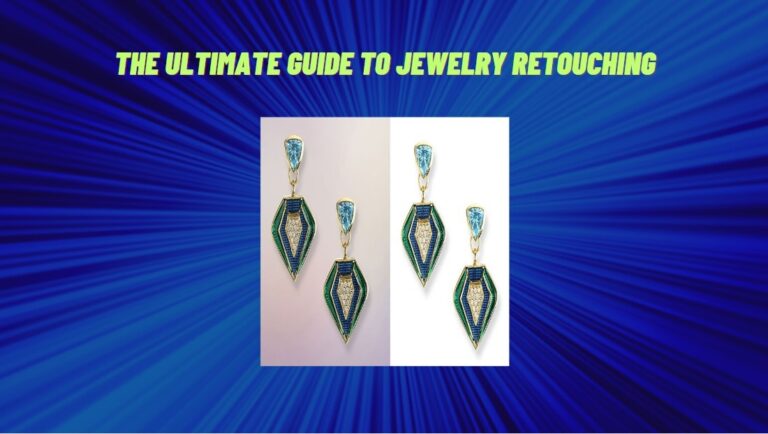
Jewelry retouching improves your jewelry photos to make them look great. Whether you’re a designer, seller, or photographer, clear, beautiful images are key to showing off your products. Retouching removes flaws, brightens colors, and makes jewelry shine more.
Jewely editing helps your photos show all the details, like the sparkle of diamonds and the smooth shine of metal. In this guide, we’ll cover the basics of jewelry retouching and how it can help your photos stand out and get more attention from customers.

Common Issues in Jewelry Photography
Jewelry photography comes with several challenges that can affect the quality of your photos. Some of the most common issues that photographers face include:
Reflections and Glare
Jewelry pieces are highly reflective, and this can make it challenging to get the perfect shot. Reflections can often appear in the background or on the jewelry itself, making it difficult to see the details of the piece. To avoid this, photographers can use a diffuser or a polarizing filter to reduce the reflections.
Poor Lighting
Jewelry photography often faces poor lighting, which can make photos look dull or unappealing. You need to fix these issues and bring out the full beauty of your jewelry pieces. To make the jewelry details clearly visible, the exposure needs to be adjusted. Through the retouching process, the details are highlighted beautifully without losing the highlights or shadows.
Background Clutter
Jewelry photos often face background problems, like distractions or unwanted elements that take the focus away from the jewelry. Retoucher need to fix these background issues by smoothing, adjusting, or replacing background entirely. Here’s how you can retouch:
Removing Distractions
If the background contains unwanted objects or clutter, you can remove them. This keeps the focus solely on the jewelry, ensuring nothing distracts from the piece.
Blurring or Softening the Background
Sometimes, the background can be too sharp or detailed, making the jewelry look less prominent. Retouch the blur or soften the background to create a pleasing contrast between the jewelry and its surroundings.
Changing the Background
If the background is not ideal, you retouch and replace it with something better. A neutral or seamless background, such as white, black, or light gray, ensures the jewelry stands out without any distraction.
Adjusting Colors and Tones
Retouch the color imbalances in the background. For example, If the background color does not match the jewelry, it needs to be adjusted accordingly.
Shadows
Shadows can also be a problem in jewelry photography. This can create unwanted dark spots on the jewelry, making it difficult to see the details. To avoid shadows, photographers can use multiple light sources to evenly light the jewelry.
Color Accuracy
The colors of the jewelry pieces can also be a problem in photography. The colors may appear differently in different lighting conditions, making it challenging to get an accurate representation of the piece. To ensure color accuracy, photographers can use color calibration tools to adjust the colors and make them appear as they should.
Focus Issues
Focus issues can make jewelry photos blurry or unclear, especially when photographing small, intricate details. If the photo is slightly out of focus, you can retouch to enhance the sharpness of the image. You need to bring out the fine details, such as gemstones, engravings, and textures. Camera may focus on the wrong part of jewelry, but you can sharpen the key elements like the pendant or clasp. You emphasizes the main subject and ensures that the details pop.

Tools and Techniques for Jewelry Retouching
Jewelry retouching requires specific tools and techniques to achieve the desired results. Some of the tools that are commonly used in jewelry retouching include:
Adobe Photoshop
Adobe Photoshop is one of the most popular photo editing software tools used by photographers. It is a powerful tool that offers a wide range of features and functions that can be used to enhance the appearance of jewelry photos. Additionally, tools like the Magic Wand Tool help quickly select and isolate specific areas based on similar colors and tones. Photoshop offers tools for removing imperfections, adjusting colors, and improving the overall look of the jewelry.
Adobe Lightroom
Adobe Lightroom is another popular photo editing software tool used by photographers. It is a great tool for batch editing and offers a range of features that can be used to enhance the appearance of jewelry photos. Lightroom offers tools for adjusting exposure, contrast, and color grading.
Wacom Tablet
A Wacom tablet is a device that allows photographers to use a pen to edit photos on their computer. It offers greater precision and control than using a mouse or touchpad, making it an essential tool for jewelry retouching.
Jewelry Photo Retouching Services
Jewelry photo retouching services are an excellent option for photographers who want to outsource their jewelry retouching needs. These services offer professional retouching at an affordable price, saving photographers time and effort.
Choosing the Right Jewelry Retouching Service
When choosing a jewelry retouching service, it is essential to consider factors such as quality, price, and turnaround time. Look for a service that offers high-quality retouching at a reasonable price and can deliver the finished photos within a reasonable timeframe.
Benefits of Outsourcing Jewelry Retouching
Outsourcing jewelry retouching has several benefits, including:
- Saves time and effort
- High-quality retouching
- Affordable pricing
- Quick turnaround time
How to Retouch Jewelry Photos Yourself
Retouching jewelry photos yourself requires some knowledge of photo editing software and techniques. Here are some tips for successful jewelry retouching:
Remove Imperfections
One of the most important steps in jewelry retouching is removing imperfections such as scratches, blemishes, and dust. Use the clone stamp tool in Photoshop to remove these imperfections and make the jewelry look perfect.
Adjust Colors
Color accuracy is essential in jewelry photography. Use the color balance tool in Photoshop to adjust the colors and make them appear as they should.
Sharpen the Image
Jewelry pieces often have intricate details that need to be sharp and clear. Use the sharpen tool in Photoshop to enhance the details and make the jewelry stand out.
Top Jewelry Photo Editing Services
Here are some of the top jewelry photo editing services available:
- Clipping Path India
- Pixelz
- Image Expert India
- FixThePhoto
- Jewelry Retouching Services
Tips for Successful Jewelry Retouching
Here are some additional tips for successful jewelry retouching:
- Use a Wacom tablet for greater precision and control
- Shoot in RAW format for greater flexibility in editing
- Use multiple light sources to avoid shadows and reflections
- Pay attention to color accuracy
- Remove all imperfections and enhance the details of the jewelry
Conclusion
Jewelry retouching is an essential process that can help to enhance the appearance of jewelry photos and attract more customers to your business. Whether you choose to retouch your jewelry photos yourself or outsource the work to a professional, it is essential to pay attention to the details and ensure that the finished product is of high quality. With the right tools and techniques, you can create stunning jewelry photos that will help to showcase your brand and attract more customers.
If you’re looking for high-quality jewelry retouching services, contact us today to learn more about our affordable and professional services.