

In today’s digital age, the importance of professional headshots cannot be overstated. Whether you’re a freelancer, a business professional, or a creative artist, your headshot often forms the first impression potential clients or collaborators have of you. To ensure your headshot makes the right impact, retouching plays a crucial role. This article dives into the world of headshot retouching software, comparing some of the best tools available and helping you choose the one that best fits your needs.
What is Headshot Retouching Software?
Headshot retouching software is specifically designed to enhance portraits, focusing on facial features and overall appearance. These tools go beyond basic editing functions to offer specialized features like skin smoothing, blemish removal, teeth whitening, and eye enhancement, among others. They are tailored to meet the high standards expected in professional headshots.
Why Use Headshot Retouching Software?
Headshot retouching software helps improve portrait photos in a practical and time-efficient way. Instead of relying on complex manual editing, these tools focus on common headshot needs such as lighting balance, skin clarity, and overall presentation.
Enhancing Professional Image
A well-retouched headshot helps you look confident, capable, and approachable without appearing edited. Retouching software improves small details like uneven lighting, mild skin distractions, or lack of sharpness, which often affect raw photos. These improvements make the image feel cleaner and more professional while keeping facial features natural. As a result, the headshot creates a stronger first impression, especially on resumes, LinkedIn profiles, and business websites.
Saving Time and Effort
Editing a headshot manually takes time and experience, especially when working with skin tones and facial details. Headshot retouching software simplifies this process by offering tools designed specifically for portraits. Instead of adjusting everything from scratch, users can make focused corrections quickly. This saves effort, reduces mistakes, and allows even beginners to achieve polished results without advanced editing skills.
Factors to Consider When Choosing Headshot Retouching Software
Choosing the right headshot retouching software depends on how well it supports natural-looking portrait edits. The focus should be on tools that improve clarity and balance without over-processing facial features.
Features and Retouching Tools
Headshot retouching software differs widely in the tools it offers. Instead of looking for the most features, it is better to choose software that includes essential portrait-focused tools with adjustable control for subtle edits.
Skin Smoothing
Skin smoothing tools should gently reduce uneven areas while preserving natural skin texture. The best tools allow fine control so the skin looks clean but still realistic.
Blemish Removal
Blemish removal tools help fix temporary imperfections like pimples or small marks. Precise, spot-based tools work best to maintain natural skin detail.
Teeth Whitening
Teeth whitening tools correct dull or yellow tones caused by lighting. Effective tools keep results subtle so the smile looks clean, not artificial.
Eye Enhancement
Eye enhancement tools improve sharpness and brightness without altering eye shape. Proper use helps draw attention to the eyes naturally.
Hair Editing
Hair editing tools manage flyaways and uneven color caused by light. Good tools improve hair clarity while keeping its natural shape.
Background Editing
Background editing tools help blur or clean distracting backgrounds. Subtle background adjustments usually look more professional than heavy replacements.
Ease of Use
Ease of use means how easy the software feels when you first open it. Good software should help users edit headshots without confusion or stress, even if they are new to photo editing.
User Interface
A simple user interface makes editing easier to understand. Clear buttons, simple menus, and easy tools help students learn editing faster without getting lost.
Learning Curve
Some software takes a long time to learn, while others are easier from the start. Software with a gentle learning curve helps users edit headshots quickly without needing advanced skills.
Compatibility
Compatibility is an important factor when choosing editing software. If the software does not match your system or tools, it can slow down your work or cause technical problems. Therefore, checking compatibility in advance helps ensure smooth and reliable performance.
Operating Systems
Not all software works on every operating system. Because of this, you should confirm that the software supports your device, whether you use Windows, macOS, or another system. Proper compatibility helps the software run faster and prevents crashes or missing features.
Integration with Other Software
Editing becomes more efficient when software works well with other tools. For example, integration with programs like Photoshop, Lightroom, or cloud platforms allows easy file sharing. As a result, you can save time and maintain a smoother workflow.
Cost and Value
Price should match how often you use the software and the features you need. This helps you get the best value without wasting money.
Pricing Models
Software may offer one-time purchases or subscriptions. Choosing the right model keeps your long-term costs under control.
Additional Costs
Some tools charge extra for add-ons or upgrades. These extra fees can increase the total cost over time.
Free Trials and Refunds
Free trials let you test features before buying. Refund policies protect you if the software does not work as expected.
Popular Headshot Retouching Software Tools
Let’s explore some of the most popular headshot retouching software tools available today:
Adobe Photoshop
Overview: Adobe Photoshop is renowned for its extensive editing capabilities, including advanced retouching tools.
Key Features: It offers tools for skin smoothing, blemish removal, and detailed editing controls for precise adjustments.
Pricing Structure: Available through Adobe Creative Cloud subscription plans, with different tiers based on user needs.
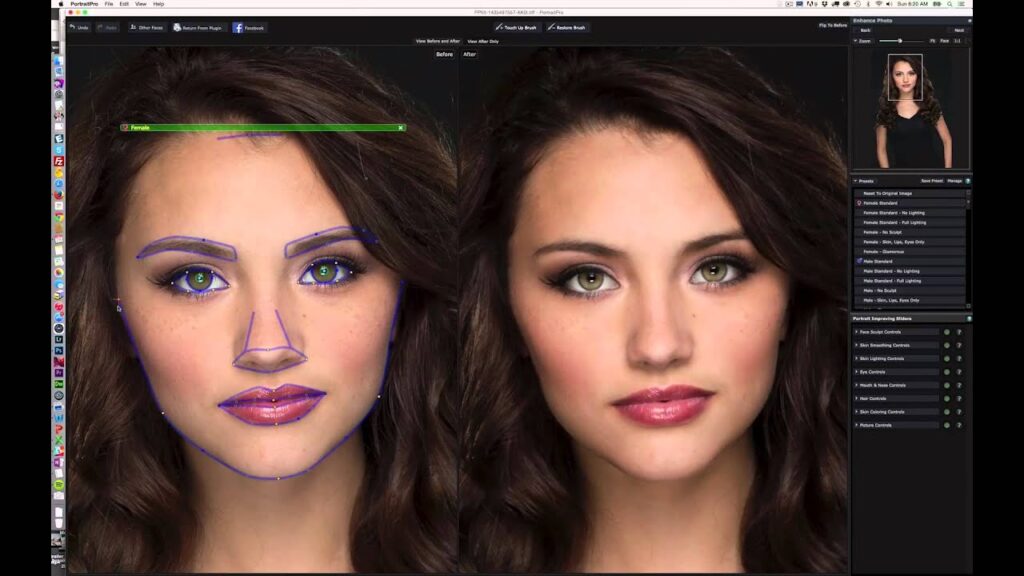
PortraitPro
Overview: PortraitPro specializes in portrait retouching, offering automated features for quick enhancements.
Automation-focused features: It includes tools for face sculpting, skin smoothing, and portrait lighting adjustments.
Pricing model: Available as a one-time purchase with optional upgrades for additional features.
Luminar AI
Overview: Luminar AI utilizes artificial intelligence for automated photo editing, including portrait enhancements.
AI-powered portrait tools: It offers AI-powered tools for face enhancement, background replacement, and creative filters.
Pricing: Available as a one-time purchase or subscription model, catering to different user preferences.
Capture One
Overview: Capture One is known for its robust RAW image processing capabilities, ideal for professional photographers.
Professional-grade RAW and skin tone tools: It includes precise color editing tools, skin tone adjustments, and high-quality image rendering.
Pricing plans: Available through subscription plans, with options for individual or studio use.
GIMP
Overview: GIMP (GNU Image Manipulation Program) is an open-source alternative to paid software, offering extensive editing capabilities.
Features: It includes tools for basic to advanced retouching, with plugins available for additional functionalities.
Pricing: Free to download and use, making it a cost-effective option for budget-conscious users.
Comparison of Headshot Retouching Software Tools
When comparing headshot retouching software tools, it is important to look beyond basic features. Instead, focusing on performance, output quality, and flexibility helps you choose software that delivers consistent and professional results.
Performance and Speed
Performance and speed matter when working with headshot retouching software, especially for batch editing. Fast processing helps save time and keeps your workflow smooth. However, speed should never reduce image quality. Reliable software processes edits quickly while maintaining accurate colors, sharp details, and consistent results across multiple images.
Quality of Retouching
The quality of retouching determines how professional the final headshot looks. Good software enhances facial features and skin texture without making the image appear artificial. Natural skin tones, preserved details, and balanced lighting are key signs of high-quality retouching. Over-smoothing or distorted features can reduce trust and visual appeal.
Flexibility and Customization
Flexibility allows users to control how much editing is applied to each headshot. Software that offers adjustable settings for facial features, skin retouching, and backgrounds gives better creative control. Customization is especially useful because different headshots require different levels of editing, depending on lighting, expression, and intended use.
Tips for Choosing the Best Headshot Retouching Software
Choosing headshot retouching software does not have to be complicated. If you slow down and think about how you actually work, the right option usually becomes clear.
Define Your Requirements
Start by asking yourself what you truly need from the software. Some users care most about clean skin retouching, while others need simple background edits. When you focus on your real needs, it becomes easier to ignore tools that look impressive but add no real value.
Read User Reviews
User reviews often tell the real story. People usually mention whether the software is easy to learn, how stable it feels, and how helpful the support team is. Reading a few honest reviews can save you time and frustration later.
Take Advantage of Free Trials
Free trials give you a chance to test the software without pressure. You can see how the tools feel, how fast the edits work, and whether the results look natural. This hands-on experience often matters more than feature lists.
Conclusion
Choosing the best headshot retouching software depends on your specific requirements, budget, and comfort level with editing tools. Whether you prioritize extensive features, ease of use, or affordability, there’s a software solution tailored to enhance your professional headshots effectively.
FAQs About Headshot Retouching Software
What is the best headshot retouching software for beginners?
The best headshot retouching software for beginners often includes user-friendly interfaces and intuitive tools. PortraitPro and Luminar AI are popular choices due to their automated features that simplify the editing process without requiring extensive manual adjustments.
Can headshot retouching software be used for other types of photo editing?
Yes, headshot retouching software can be used for various types of photo editing beyond portraits. Many of these tools offer functionalities for general photo retouching, such as adjusting lighting, color correction, and even basic graphic design elements.
Is headshot retouching software worth the cost?
Headshot retouching software is worth the cost for professionals who require high-quality, consistent results in their portrait work. The efficiency gained from automated tools and the ability to achieve polished, professional-looking headshots can justify the investment for many users.
How do I know which features I need in headshot retouching software?
Identifying your specific needs is crucial when choosing headshot retouching software. Consider the types of edits you frequently perform, such as skin retouching, background adjustments, or enhancing facial features. Look for software that offers these specific tools to streamline your workflow.
Are there any free alternatives to paid headshot retouching software?
Yes, GIMP (GNU Image Manipulation Program) is a notable free alternative to paid headshot retouching software. It offers comprehensive editing capabilities, including tools for basic to advanced retouching, making it a viable option for budget-conscious users or those who prefer open-source software.















